

Class 2 vs Class 3 DSC: Key Differences, Uses & Which DSC You Need in 2026
Digital signatures have become an essential part of secure online transactions in India. From filing government tenders to submitting tax returns and signing official documents, a Digital Signature Certificate (DSC) helps verify identity and ensures document authenticity.
Many users still search for “Class 2 vs Class 3 DSC” because they are confused about the difference and which one they actually need today.
In this detailed guide, we will explain:
- What Class 2 DSC was
- What Class 3 DSC is
- Key differences between them
- Which digital signature you should use today
- How to upgrade from Class 2 to Class 3 DSC
- Step-by-step issuance process
By the end of this article, you will clearly understand which DSC is valid in India and how to obtain one quickly.
What is a Digital Signature Certificate (DSC)?
A Digital Signature Certificate (DSC) is an electronic form of a signature issued by licensed Certifying Authorities (CAs) in India.
It is used to:
- Verify the identity of the signer
- Secure digital documents
- Ensure data integrity
- Authenticate online transactions
DSCs are widely used in portals like:
- Income Tax e-Filing
- MCA (Ministry of Corporate Affairs)
- GST Portal
- eTendering portals
- Government procurement platforms
The certificate is usually stored inside a USB token which ensures the highest level of security.
What Was Class 2 DSC?
Class 2 DSC was earlier used for identity verification with moderate assurance.
It was commonly used for:
- Income Tax return filing
- MCA company filings
- GST applications
- Director KYC verification
However, the identity verification for Class 2 DSC was based on basic document validation, which provided limited security compared to higher classes.
Important Update
The Controller of Certifying Authorities (CCA), India discontinued Class 2 DSC in 2021.
Now Class 3 DSC has replaced Class 2 for almost all purposes.
What is Class 3 DSC?
Class 3 DSC is the highest level of digital signature certificate available for individuals and organizations.
It requires strict identity verification, making it far more secure.
Class 3 DSC is now mandatory for:
- eTender filing
- eProcurement portals
- ICEGATE
- DGFT
- MCA filings
- Income Tax filings
- GST filings
- Trademark and patent filing
In simple words:
Class 3 DSC now works for all portals where Class 2 was previously used.
Class 2 vs Class 3 DSC – Key Differences
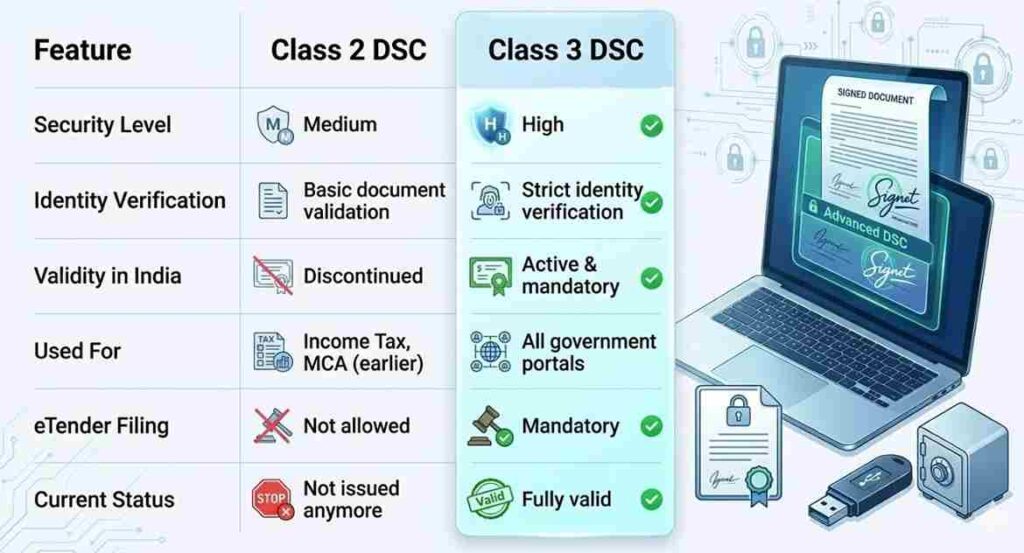
| Feature | Class 2 DSC | Class 3 DSC |
|---|---|---|
| Security Level | Medium | High |
| Identity Verification | Basic document validation | Strict identity verification |
| Validity in India | Discontinued | Active & mandatory |
| Used For | Income Tax, MCA (earlier) | All government portals |
| eTender Filing | Not allowed | Mandatory |
| Current Status | Not issued anymore | Fully valid |
Quick Summary
Class 2 DSC has been completely replaced by Class 3 DSC, so anyone who needs a digital signature today must obtain Class 3 DSC.
Usage Scenarios of Class 3 DSC
Class 3 DSC is used across multiple government and corporate platforms.
Common uses include:
Government Filings
- Income Tax e-filing
- GST registration and filing
- MCA filings
Tender Participation
- Government e-tenders
- State procurement portals
- GeM portal
Trade & Export
- DGFT portal
- ICEGATE portal
Intellectual Property
- Trademark filing
- Patent filing
Because of its high security level, Class 3 DSC is now the standard certificate used in India.
Which DSC Should You Choose?
Since Class 2 is discontinued, your choice is simple.
You need Class 3 DSC, but there are different types depending on your purpose.
1. Individual DSC
Used for:
- Income Tax filing
- Personal compliance
- Director filings
2. Organization DSC
Used for:
- Company filings
- GST filings
- Corporate compliance
3. Tender DSC
Used for:
- Government tenders
- eProcurement platforms
- Contractor participation
How to Upgrade from Class 2 to Class 3 DSC
If you previously used Class 2 DSC, you simply need to apply for a new Class 3 certificate.
Upgrade Process
- Choose a licensed DSC provider
- Select Class 3 DSC
- Complete Aadhaar / video verification
- Submit documents
- Receive DSC in USB token
- Install the token driver
The upgrade process usually takes 15–30 minutes with online verification.
Digital Signature Certificate Issuance Flow
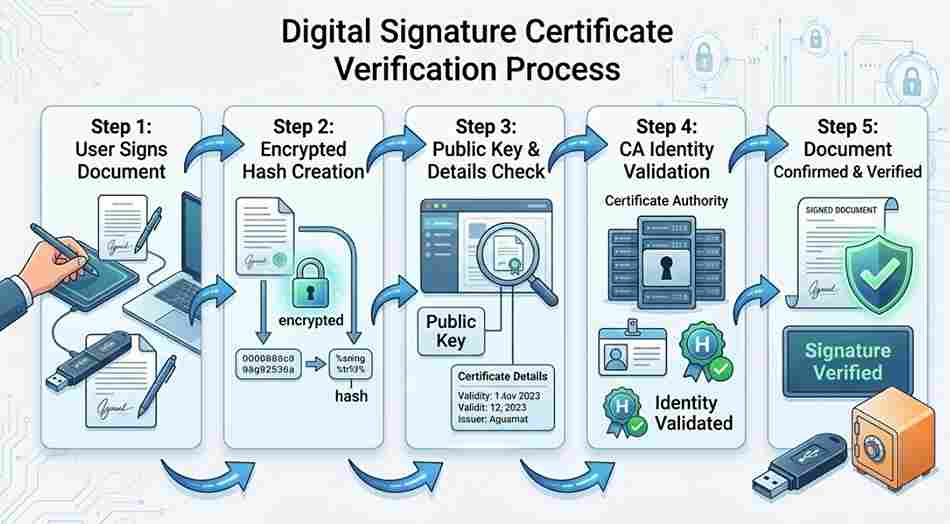
Here is the standard process followed by most Certifying Authorities.
Step 1 – Application
Fill the online DSC application form.
Step 2 – Identity Verification
Verification is completed through:
- Aadhaar OTP
or - Video verification
Step 3 – Document Approval
The certifying authority validates the submitted documents.
Step 4 – Certificate Generation
Your DSC is generated securely.
Step 5 – USB Token Installation
The certificate is stored in a secure USB token device.
After installation, you can start using it for digital signing.
Why Class 3 DSC is Mandatory Today
Government portals now require higher security standards.
Class 3 DSC ensures:
- Strong identity verification
- Tamper-proof document signing
- Legal validity under IT Act 2000
- Secure online transactions
Because of this, Class 3 DSC is now the universal digital signature in India.
Conclusion
Understanding the difference between Class 2 vs Class 3 DSC is important for anyone dealing with digital filings.
The key takeaway is simple:
- Class 2 DSC is discontinued
- Class 3 DSC is now mandatory for almost all uses
If you need a digital signature today, you should apply for Class 3 DSC with proper verification and a secure USB token.
Support & DSC Application
If you need help applying for a Class 3 Digital Signature Certificate, our team can assist you with quick issuance and complete guidance.
We provide:
- New DSC issuance
- DSC renewal
- USB token support
- Installation assistance
- Error troubleshooting
Apply online:
https://digitalsignaturespot.com/product/digital-signature-certificate-renewal-online/
Or contact us directly for quick support.
WhatsApp / Call: +91-7579984381
Frequently Asked Questions (FAQ)
Is Class 2 DSC still valid?
No. Class 2 DSC has been discontinued by the Controller of Certifying Authorities in India. Only Class 3 DSC is issued now.
Can I use Class 3 DSC for Income Tax filing?
Yes. Class 3 DSC works for Income Tax, MCA, GST, and most government portals.
Is Class 3 DSC required for eTender?
Yes. Class 3 DSC is mandatory for eTender and eProcurement portals.
What is the validity of Class 3 DSC?
Class 3 DSC is usually issued for 1 year, 2 years, or 3 years.
Do I need a USB token for DSC?
Yes. For security reasons, DSC must be stored in a USB crypto token device.
How long does DSC issuance take?
With online verification, DSC can be issued within 15–30 minutes in most cases.
About the Author
Smarth is a Digital Signature expert and founder associated with Digital Signature Spot, a platform that helps individuals and businesses obtain Digital Signature Certificates quickly and securely.
With years of experience in DSC issuance, token installation, and portal troubleshooting, he regularly publishes practical guides to help users solve digital signature problems and understand government compliance processes.
His mission is to simplify Digital Signature Certificates, eTender processes, and government portal compliance for professionals, businesses, and consultants across India.
Common DSC Errors Users Face (And Solutions)
While using a Digital Signature Certificate (DSC) for filing or signing documents, users often encounter technical issues related to drivers, browsers, or token configuration. Understanding these common errors and their solutions can save time and prevent filing delays.
Below are some of the most frequent DSC problems and how to fix them.
1. USB Token Not Detected
One of the most common issues users face is that the USB token is not detected by the computer.
Possible Causes
- Token driver not installed
- Outdated token driver
- USB port issue
- Token not properly connected
Solution
- Remove the USB token from your system.
- Install the latest token driver.
- Restart the system.
- Insert the token again.
For example, if you are using Watchdata ProxKey token, you can download the driver here:
WD ProxKey Driver:
https://www.support.cryptoplanet.in/downloads.php
After installing the driver, reconnect the token and check again.
2. Digital Signature Not Showing in Browser
Sometimes the DSC is installed correctly but does not appear when signing on portals like Income Tax, MCA, or GST.
Possible Causes
- Browser compatibility issue
- Missing emSigner utility
- Java configuration problem
- Browser security settings
Solution
- Use Google Chrome or Microsoft Edge (latest version)
- Install the required emSigner utility
- Restart the browser after token connection
- Ensure the token driver is running properly
Most government portals require emSigner running in the background for DSC authentication.
3. “Private Key Not Found” Error
This error occurs when the system cannot locate the private key associated with the digital certificate.
Possible Causes
- Certificate not properly installed
- Token driver issue
- Certificate corruption
Solution
- Remove the token and reconnect it.
- Reinstall the token driver.
- Check the certificate using the token manager software.
If the certificate still does not appear, contact your DSC provider for verification.
4. DSC Not Registered on Portal
Some portals require manual DSC registration before it can be used for signing.
Example Portals
- Income Tax Portal
- MCA Portal
- GST Portal
Solution
Go to the portal’s profile or DSC registration section and register your digital signature before signing documents.
Once registered, the portal will recognize your DSC automatically.
5. Wrong Token Password Error
Many users face login issues because of incorrect token password attempts.
Important Points
- USB tokens usually allow limited password attempts.
- After multiple incorrect attempts, the token may lock permanently.
Solution
- Carefully enter the correct token password.
- If the token is locked, it may require token reset or replacement.
Always keep your token password stored securely.
Pro Tip: Prevent DSC Errors
You can avoid most digital signature issues by following these simple steps:
- Always use the latest token driver
- Use updated browsers
- Keep emSigner utility installed
- Restart the browser before signing
- Insert the token before opening the portal
These small steps help ensure smooth DSC usage on government portals.
Need Help with DSC Installation or Errors?
If you are facing problems with your Digital Signature Certificate, USB token driver, or portal signing, our team can help you quickly resolve the issue.
We provide support for:
- DSC installation
- Token driver setup
- eTender signing issues
- Income Tax / MCA / GST DSC errors
- DSC renewal and issuance
For quick assistance:
🌐 Website:
https://digitalsignaturespot.com
📞 Call / WhatsApp:
+91-7579984381
Our experts will guide you step-by-step to get your digital signature working smoothly.

About author











Add comment